
How to Make a Birthday Slideshow for Your Child – A DIY Memory Gift
Hey there, fellow parents! Remember all those precious moments you’ve captured of your little ones – the first steps, the toothless grins, the elaborate blanket forts? They’re tucked away in your phone, on your hard drive, or perhaps even in dusty photo albums. What if I told you there’s a super easy, incredibly rewarding way to bring those memories to life and create a truly unforgettable gift?
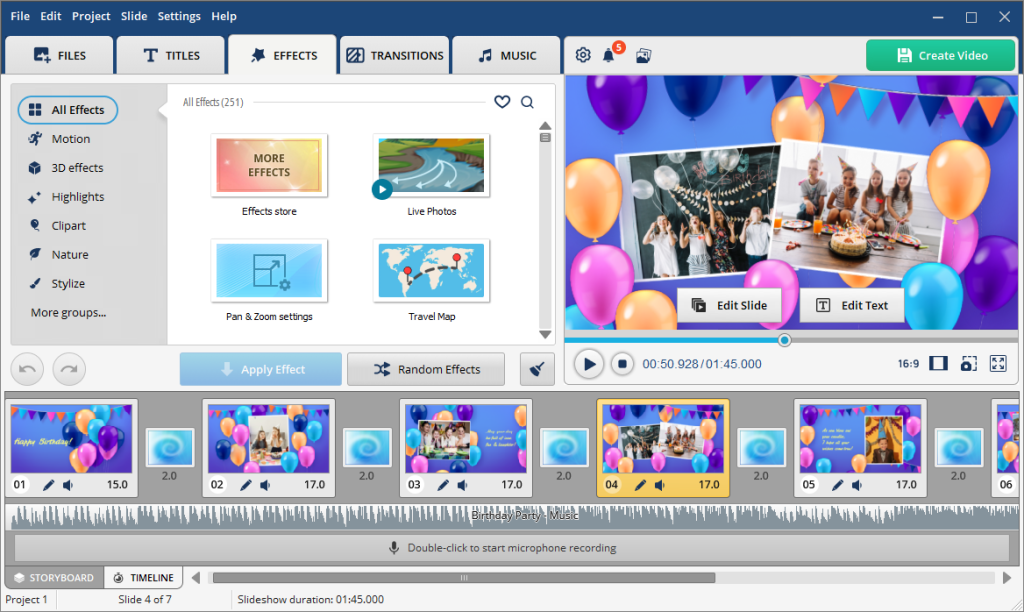
That’s right, we’re talking about how to make a birthday slideshow – with simple apps like SmartSHOW 3D is as easy and fun as it gets! Think of it as a personalized movie starring your kids, crafted with your own hands and brimming with love. It’s a gift that speaks volumes, whether it’s for grandparents, aunts and uncles, or even for your child themselves to cherish as they grow. And trust me, you don’t need to be a tech wizard to make it happen! If you can navigate your phone, you can create a beautiful slideshow.
Why a Slideshow?
A photo slideshow for children’s birthday isn’t just a collection of photos; it’s a narrative, a journey through time that highlights the joy, growth, and unique personality of your child. It’s a way to:
- Relive Cherished Memories: Seeing those moments flicker across the screen, set to music, is a magical experience.
- Share the Love: Grandparents especially adore these personal touches. It’s a gift they can watch again and again.
- Celebrate Milestones: Birthdays, graduations (even from kindergarten!), holidays – a slideshow is the perfect way to commemorate any special occasion.
- Create a Legacy: Imagine your child watching this video years from now, seeing their own childhood unfold. Priceless!
Getting Started
First things first, let’s gather your “ingredients.” This is the fun part!
- Photos & Videos Galore: Dig through your phone, computer, and old cameras. Don’t be afraid to pull out a lot – you can always edit later. Think beyond just portraits; capture candid moments, drawings, funny antics, and even short video clips.
- A Theme (Optional, but Fun!): Having a theme can help guide your selection and design. Here are some birthday slideshow ideas:
- “A Year in the Life”: Great for birthdays or holiday gifts, showcasing growth over 12 months.
- “Our Little Adventurer”: Photos of outdoor play, trips, and exploring.
- “From Tiny Toes to Big Steps”: A chronological journey from babyhood to their current age.
- “Silly & Sweet Moments”: Focus on their funniest faces, sweet hugs, and quirky habits.
- “My Favorite Things”: Pictures of them with their favorite toys, pets, or people.
Designing Your Masterpiece
Now for the artistic touch! This is where your personal style shines through.
Backgrounds:
Keep backgrounds simple and complementary to your photos. Many slideshow apps offer built-in options.
- Soft Gradients: Gentle color transitions that don’t distract.
- Subtle Patterns: Think polka dots, stripes, or stars in muted tones.
- Solid Colors: Choose colors that match the mood of the section (e.g., bright for playful moments, soft pastels for sleepy baby pics).
- “Photo as Background”: Sometimes, a slightly blurred version of one of your own photos can make a beautiful, personal background.
Captions & Text:
This is your chance to add your voice and tell the story!
- Dates & Ages: Simple and effective for chronological slideshows.
- Sweet Anecdotes: “Remember when she tried to feed the dog her peas?” or “His first time seeing snow!”
- Inside Jokes: A little wink and a nod that only your family will understand.
- Quotes: Short, heartwarming quotes about childhood, family, or love.
- Milestones: “First Steps,” “Lost Her First Tooth,” “Graduated Pre-K!”
- Messages of Love: A simple “We love you!” or “So proud of you!” at the beginning or end.
Music: The Soundtrack to Their Story
Create a slideshow with music to set the mood!
- Upbeat & Playful: For energetic montages of running and laughing.
- Soft & Sweet: Perfect for baby photos or tender moments.
- Family Favorites: Do you have a song that always makes your family sing along? Include it!
- Classical Lullabies: Gentle and soothing for younger children’s photos.
- Instrumental Tracks: Often less distracting than songs with lyrics, allowing the photos to take center stage.
- Mix it Up! Don’t be afraid to use a few different songs throughout your slideshow to match the changing moods of the photos.
Let’s Get “Making”!
There are many user-friendly apps and software options available, often free or with a trial, that make this process a breeze. A quick search for “how to make a birthday slideshow” will reveal plenty of choices.
Here’s a simplified process:
- Choose Your Tool: Find an app or software you like. Most are intuitive!
- Import Your Media: Upload your selected photos and video clips.
- Arrange & Trim: Drag and drop to put them in order. Trim video clips to just the best parts.
- Add Text & Captions: Type in your heartfelt messages.
- Select Backgrounds: Choose a look that complements your photos.
- Pick Your Music: Add your chosen tracks.
- Preview & Edit: Watch it through! Adjust timings, fix typos, and make sure it flows beautifully.
- Export & Share! Once you’re happy, save your creation and share it with loved ones.
A Gift from the Heart
Creating a video slideshow is more than just a DIY birthday gift for kids; it’s an act of love. It’s a chance to revisit those precious moments, to smile, to laugh, and perhaps even shed a happy tear or two. And when you present that personalized gift, knowing you made it yourself, the joy it brings will be absolutely immeasurable.
So, go ahead! Dive into those digital memories, unleash your creativity, and craft a truly unforgettable gift that celebrates the beautiful journey of your child. Happy making!